
Blog: Djordje

Eporezi on linux

Setting up Serbian e-gov on Linux is basically the "final boss" of Ubuntu configuration.

Guide: Setting up ePorezi (SmartBox) on Ubuntu

This guide explains how to set up the Serbian Tax Administration (ePorezi) portal on Ubuntu using the community-developed Baš Čelik instead of the buggy official Java application.

1. Prerequisites

Ensure your smart card reader hardware is recognized by the system:

sudo apt update
sudo apt install pcscd libccid pcsc-tools
sudo systemctl enable --now pcscd

verify

sudo systemctl status pcscd

if you have a card inserted you can read it

pcsc_scan

2. Install Baš Čelik (The Interface)

Instead of the official SmartBox, we use Baš Čelik because it is native and stable.

  1. Download the latest bas-celik.linux.amd64.tar.xz from GitHub Releases.
  2. Extract the archive and enter the directory.
  3. Install it system-wide:
sudo make install

3. Install the MUP Driver (The Middleware)

The official trustedge package often lacks the necessary .so library for Linux. Use the open-source alternative:

  1. Download libsrb-id-pkcs11.so from srb-id-pkcs11 Releases.
  2. Move it to a permanent location:
mkdir -p ~/lib
cp libsrb-id-pkcs11.so ~/lib/

4. Configuration

  1. Open Baš Čelik.
bas-celik
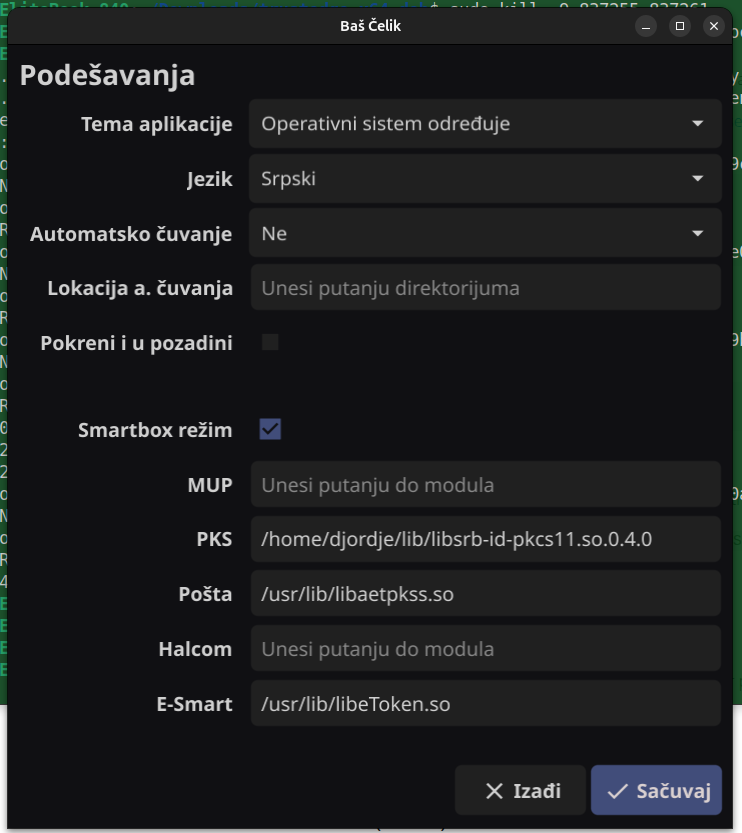
  1. Click the Gear Icon (Settings).

Image without description

  1. SmartBox Mod: Toggle to ON. (This allows the app to mimic the official ePorezi software).

  2. PKCS#11 Moduli: Click + and select the path: /home/YOUR_USER/lib/libsrb-id-pkcs11.so.

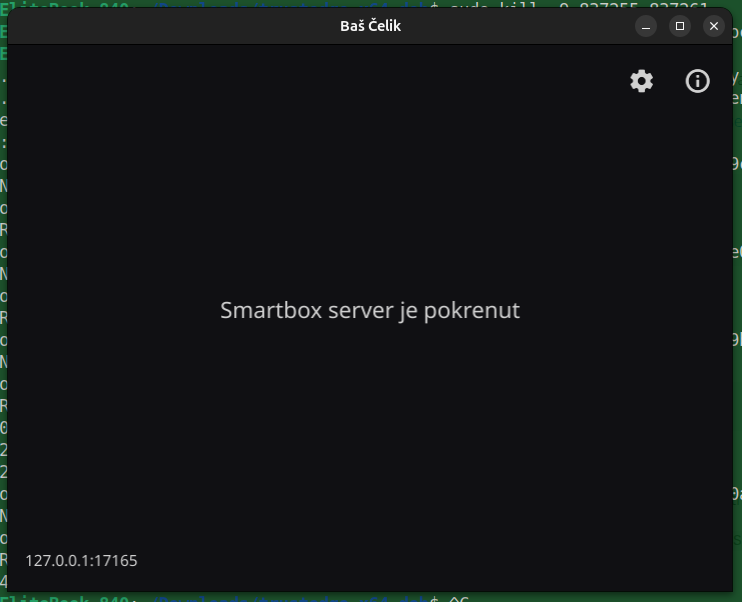
  3. Restart the app.

Image without description

6. How to Log In

  1. Open Baš Čelik and ensure it started in SmartBox mode.
  2. Leave the app running in the background.
  3. Go to eporezi.purs.gov.rs.
  4. Click Пријава путем SmartBox апликације.
  5. Enter your PIN in the Baš Čelik popup.

Browser Note (SSL Fix)

If the browser doesn't see the app, go to https://localhost:20806 in a new tab, click Advanced, and Proceed to localhost (unsafe). This whitelists the local communication.

Preventing System Freezes on Ubuntu 24.04 (Cursor & Memory Exhaustion)

When using AI-heavy editors like Cursor, the system can occasionally freeze or become unresponsive as the app consumes RAM to store agent chats and index files. This guide explains how to configure Ubuntu's built-in systemd-oomd and optimize swappiness to kill the process before the system locks up.

  1. Optimize Swappiness for 32GB+ RAM By default, Ubuntu is aggressive about using the swap file (on the slow disk). On machines with high RAM, this causes "stuttering." We want the system to prioritize your fast RAM.

Check current value:

bash
cat /proc/sys/vm/swappiness

Change it to 10 (Permanent): Open the configuration file:

bash
sudo nano /etc/sysctl.conf

Add this line to the bottom:

vm.swappiness=10

Apply without rebooting:

bash
sudo sysctl -p
  1. Configure the OOM Killer (systemd-oomd)

Ubuntu 24.04 includes systemd-oomd, which monitors "Memory Pressure." If Cursor starts eating RAM too fast, this tool will kill it to save the OS.

Edit the OOM configuration:

bash
sudo nano /etc/systemd/oomd.conf

Set the Kill Thresholds:

Use these settings to trigger a kill when your Swap is 85% full (preventing a total freeze): ini [OOM]

SwapUsedLimit=85%
DefaultMemoryPressureLimit=60%
DefaultMemoryPressureDurationSec=20s

Restart the service:

bash
sudo systemctl restart systemd-oomd
  1. How to Monitor Cursor's Memory Use To see if Cursor is the culprit in real-time, use oomctl. This tool shows you exactly which "slice" of your system is under pressure.
bash
oomctl

If Cursor is killed, you can verify it in the logs:

bash
journalctl -u systemd-oomd --since="10 minutes ago"
  1. Emergency Recovery (The "Magic" Keys) If your system does freeze before the killer acts, do not pull the power plug. Use the Magic SysRq keys to trigger a manual kill: Hold Alt + SysRq (Print Screen). While holding them, tap f. This forces the kernel to immediately kill the most memory-expensive process (usually Cursor/Chrome).

Snap Ram Monitor

Get it from the Snap Store

🖥️ RAM Monitor: Preventing Linux Freezes Before They Happen

The Problem I Discovered

After years of using Linux as my daily driver, I found a critical flaw: Linux has no built-in mechanism to prevent memory exhaustion. Here's my story:

  • Cursor Editor (my favorite code editor) gradually fills up RAM during long coding sessions
  • Ubuntu provides no warnings until memory hits 95%+
  • System becomes completely unresponsive - frozen, unusable, requiring hard reset
  • Simple solution exists: Restart Cursor to flush memory, but you need advance warning

The Solution: RAM Monitor

I built a lightweight snap package that monitors RAM usage and sends desktop notifications before disaster strikes.

Key Features

  • 🔄 Continuous monitoring every 60 seconds
  • 🔔 Desktop notifications when threshold exceeded
  • ⚙️ Configurable alerts (default 80%, customizable via environment variables)
  • 🔧 Systemd daemon - runs automatically after install
  • 📦 Snap packaged - works on Ubuntu and compatible distributions

Installation

sudo snap install ram-monitor

Usage

# Monitor with default 80% threshold
snap run ram-monitor.ram-monitor

# Custom threshold (e.g., 70%)
RAM_THRESHOLD=70 snap run ram-monitor.ram-monitor

# Make permanent
echo 'export RAM_THRESHOLD=75' >> ~/.bashrc

Why This Matters

Memory management is crucial for developer productivity: - 💻 Prevent lost work from system freezes - 🕐 Save time vs. waiting for hard resets - 🎯 Stay productive during long coding sessions - 🐧 Addresses Linux limitation in memory monitoring

Technical Details

  • Language: Bash script
  • Monitoring: /proc/meminfo parsing
  • Notifications: libnotify integration
  • Packaging: Snap (universal Linux packages)
  • Resource usage: < 1MB RAM, < 0.1% CPU

Open Source

The code is available on GitHub with comprehensive documentation: - 📖 Full README: Installation, configuration, troubleshooting - 🔧 Development guide: How to build and contribute - 📦 Snap packaging: Ready for distribution

Repository: https://github.com/djordjep/ram-monitor-snap

The Bigger Picture

This experience taught me about Linux memory management limitations. While tools like htop exist for monitoring, they require active user attention. RAM Monitor provides passive, automatic protection - exactly what developers need for uninterrupted workflow.

Available now on Snap Store: sudo snap install ram-monitor


Release Description for v0.2.0

🎯 What This Release Solves

After extensive testing and 6 failed snap releases, we discovered fundamental limitations with Snap packaging that prevented the RAM monitor from working reliably:

Snap Limitations Discovered: - System daemons cannot access user desktop sessions (notifications fail) - User daemons require experimental flags (experimental.user-daemons=true) - Autostart helpers don't work consistently across desktop environments - Result: App appeared to install but never actually monitored or notified

✅ The Solution: .deb Package

v0.2.0 introduces .deb packaging with systemd user service - the standard Linux approach that actually works:

# Download and install
wget https://github.com/djordjep/ram-monitor-snap/releases/download/v0.2.0/ram-monitor_0.2.0_amd64.deb
sudo dpkg -i ram-monitor_0.2.0_amd64.deb

# Works automatically after login!

🚀 What Works Now

  • Auto-starts on login (systemd user service)
  • Desktop notifications (runs in user session with DBus access)
  • Zero manual steps (post-install script handles everything)
  • Reliable monitoring (background process survives reboots)
  • Clear logging (journalctl --user -u ram-monitor)

📦 Distribution Strategy

Primary: .deb package (recommended for best experience)
Secondary: Snap package (available but requires manual start)

🔧 For Existing Snap Users

If you installed via Snap Store:

# Remove snap version
sudo snap remove ram-monitor

# Install .deb version  
wget https://github.com/djordjep/ram-monitor-snap/releases/download/v0.2.0/ram-monitor_0.2.0_amd64.deb
sudo dpkg -i ram-monitor_0.2.0_amd64.deb

📋 Files

  • ram-monitor_0.2.0_amd64.deb - Production Ubuntu/Debian package
  • Complete packaging infrastructure in repository

🎉 Result

The RAM monitor now delivers on its promise: install → works automatically → monitors RAM → sends notifications → zero hassle!


Technical Details:
- Systemd user service replaces problematic snap daemon
- Native desktop integration vs snap confinement limitations
- Standard Linux packaging patterns for maximum compatibility

This release represents a complete pivot from experimental Snap features to proven Linux packaging standards. The app now "just works" as originally intended! 🚀


Assets:
- ram-monitor_0.2.0_amd64.deb - Ubuntu/Debian package
- Source code available in repository

Built with ❤️ (Cursor + Grok code) to solve a real Linux usability issue. No more frozen systems during deep coding sessions!
High Performance Health Guide by Gary Brecka

High Performance Health Guide by Gary Brecka

The summary taken from the podcast:

World No.1 Biohacker: The Fastest Way To Burn Fat, Build Muscle & Live Longer

Fundamental Health Requirements

  • Essential Daily Nutrients:
    • 8 essential amino acids
    • 2 essential fatty acids (omega-3, EPA and DHA)
    • 91 essential minerals

Breathing & Oxygen Protocol

Daily Breath Work (Wim Hof Method)

1. Perform 3 rounds:
   - Start with 5 breaths
   - Build up to 30 breaths
   - Take deep "obnoxious" breaths
   - Hold breath after exhale
   - Deep breath in and hold
2. Best practices:
   - Do outside during first morning light
   - Takes ~8 minutes

Sleep Optimization

Core Protocol

1. Set consistent bedtime
2. Take magnesium supplement
3. Do contrast shower before bed
4. Darken room completely
5. Keep room at 68-69°F (20°C)
6. No screens/alcohol before bed
7. Stop eating 2 hours before bed

Natural Sleep Aid Breathing

- 6-second inhale through nose
- Hold 3 seconds
- 6-second exhale through mouth
- Visualize breathing out thoughts

Cold Exposure Protocol

Ice Bath:
- Temperature: 10°C (50°F)
- Duration: 3-6 minutes
Alternative: Cold shower

Benefits:
- Improves insulin sensitivity
- Releases cold shock proteins
- Activates brown fat

Stress Management

  • Monitor catecholamine levels
  • Supplement with B-complex vitamins
  • Focus on B12 (methylcobalamin form)

Essential Health Testing

1. One-time Tests:
   - Genetic methylation test

2. Regular Blood Work:
   - Glycemic control
   - Hormone balance
   - Nutrient deficiencies

Daily Routine Guidelines

Morning Routine Requirements

Must be:
- Free (no cost)
- Portable
- Consistent

Include:
- Sunlight exposure
- Grounding
- Breath work

Movement Guidelines

  • Avoid sedentary lifestyle
  • Regular movement throughout day
  • Incorporate occasional sprinting

Nutrition Framework

Core Principles

1. Focus on feeding gut bacteria
2. Address basic deficiencies first
3. Avoid chasing exotic supplements
4. Use mineral water for hydration

Key Principle: Focus on fundamental health basics before pursuing complex optimizations. Maintain consistency in routines. Most health issues stem from basic nutrient deficiencies rather than inherited conditions.

CIRS

Expert Doctor Unveils the Hidden Epidemic of Biotoxin/Mold Illness (CIRS)

This is an extraction from the EONutrition podcast. For more information, visit the official podcast page.

Guest: Dr Sandeep Gupta, one of the leading authorities on Mold/Biotoxin Illness & Chronic Inflammatory Response Syndrome.

A comprehensive report on diagnostic tests and treatments for Chronic Inflammatory Response Syndrome (CIRS) and mold illness based on the doctor's recommendations in the talk.


Diagnostic Tests and Treatments for CIRS (Mold Illness)

1. Key Diagnostic Tests for CIRS

  1. Vascular Endothelial Growth Factor (VEGF)

    • Purpose: VEGF is essential for blood vessel health and oxygen delivery. Low levels can indicate compromised blood flow, common in CIRS.
    • Optimal Range: This varies, but the presence of chronic inflammation and reduced VEGF could signify vascular issues related to toxin exposure.
  2. Adrenocorticotropic Hormone (ACTH) and Cortisol

    • Purpose: Measures adrenal function, as CIRS can disrupt adrenal hormones, affecting energy and stress response.
    • Key Markers: Imbalanced ACTH and cortisol levels may indicate adrenal fatigue or dysregulation due to chronic stress and inflammation.
  3. Melanocyte-Stimulating Hormone (MSH)

    • Purpose: MSH impacts immune function, gut health, and inflammation control. Low levels are commonly observed in CIRS and correlate with increased susceptibility to mold-related illness.
    • Notes: Low MSH is associated with inflammation, increased sensitivity to toxins, and immune dysregulation.
  4. Vasoactive Intestinal Polypeptide (VIP)

    • Purpose: VIP regulates inflammation and immune response. Low VIP levels are typical in CIRS and contribute to symptoms like fatigue, pain, and brain fog.
    • Notes: VIP nasal spray may be prescribed as part of treatment if levels are low, although this is generally done later in treatment to avoid worsening inflammation.
  5. Transforming Growth Factor Beta-1 (TGF-b1)

    • Purpose: TGF-b1 is a key marker of immune system activation and tissue inflammation.
    • Optimal Range: 867 - 6,662 pg/mL. Elevated TGF-b1 indicates an immune response to chronic inflammation, often linked with mold exposure.
    • Notes: High levels are managed through anti-inflammatory treatments and binders to reduce systemic biotoxin load.
  6. Matrix Metalloproteinase-9 (MMP-9)

    • Purpose: MMP-9 is an enzyme related to inflammatory response, especially in blood vessels. Elevated levels are common in CIRS and can indicate increased vascular permeability.
    • Notes: MMP-9 levels are controlled by anti-inflammatory agents and lifestyle adjustments to reduce inflammation.
  7. Complement C4a and C3a Proteins

    • Purpose: These proteins are markers for immune response and inflammation. Elevated levels indicate immune activation in response to biotoxins.
    • Notes: High C4a levels specifically correlate with exposure to water-damaged buildings, and managing this requires addressing environmental sources of exposure.
  8. NeuroQuant MRI (Optional)

    • Purpose: Measures structural brain changes that occur in response to chronic inflammation, often present in CIRS.
    • Key Areas: White matter inflammation or atrophy in specific brain regions can indicate the neurological impact of mold toxicity.

2. Treatment Protocols for CIRS

A. Toxin Binding Agents

  1. Cholestyramine

    • Usage: A primary binder used to sequester and remove biotoxins from the body.
    • Dosage: Often prescribed in powder form, taken multiple times per day. Exact dosage is patient-specific.
    • Notes: Ensure regular bowel movements to avoid toxin reabsorption, and separate intake from other medications/supplements.
  2. Activated Charcoal, Bentonite Clay, and Zeolite

    • Usage: Additional binders, particularly for patients sensitive to Cholestyramine.
    • Notes: These help reduce toxin levels and should be used with adequate hydration and bowel regulation.
  3. Modified Citrus Pectin

    • Usage: Primarily for chemical toxicity but also considered for its binding properties in toxin removal.
    • Notes: Generally reserved for those with chemical sensitivities rather than as a primary mold binder.

B. Anti-Inflammatory and Immune-Modulating Therapies

  1. VIP (Vasoactive Intestinal Peptide) Nasal Spray

    • Usage: Administered in cases with low VIP levels to reduce inflammation and improve immune regulation.
    • Timing: Typically introduced later in treatment once inflammation is managed to avoid aggravating symptoms.
  2. Omega-3 Fatty Acids and Curcumin

    • Usage: Anti-inflammatory supplements to help reduce systemic inflammation and support recovery.
    • Notes: Often used alongside binders and other therapies for comprehensive support.

C. Hormonal and Methylation Support

  1. SAMe (S-Adenosyl Methionine)

    • Usage: For patients with undermethylation issues, SAMe supports detox pathways and improves neurological function.
    • Notes: Patients with the COMT gene mutation should use SAMe cautiously, as it can cause overstimulation.
  2. Hydroxocobalamin and Folate

    • Usage: These support methylation and help regulate inflammation. Folate can decrease overmethylation for those with sensitivities.

D. Antimicrobial and Immune-Supporting Agents

  1. CellCore Biosciences Products
    • Usage: Products such as “Para” series for parasite cleansing and “BioToxin Binder” with fulvic acid for toxin binding.
    • Notes: Often included in detox protocols, but should be used cautiously to avoid overwhelming the system.

3. Monitoring and Lifestyle Recommendations

  • Home Environment Testing: Use HERSTMI-2 or EMMA tests to detect mold presence and assess toxin exposure in living spaces. Ensuring a safe, mold-free environment is essential for treatment success.
  • Genetic Testing: Identifies vulnerabilities like the HLA-DR gene, which may make individuals more susceptible to mold illness.
  • Hydration and Bowel Health: Maintaining adequate hydration and digestive regularity is critical during detox to facilitate toxin elimination and prevent reabsorption.
  • Professional Guidance: A qualified practitioner should oversee testing and treatment, as protocols are highly individualized and should be tailored to personal needs and test results.

This report combines all the diagnostics, treatments, and specific considerations discussed by the doctor for effectively managing CIRS and mold illness. Each component works to address biotoxin burden, immune dysregulation, and inflammation, contributing to an integrated approach to recovery.